Settlement CSV / XLSX file checker
Check a settlement CSV or XLSX file for missing columns and invalid rows before reconciliation. No sign-in required; limited to 512 KiB and 2,000 data rows per file.
BankReconcile · Early access
Reconcile orders, payments, payouts and bank deposits from CSV or XLSX. Review differences with source evidence and publish an independently approved Excel workpaper.
Import CSV or XLSX, review field mappings, run deterministic checks, assign exceptions and obtain an independent approval. Published versions include the original evidence and checksums.
Private beta. Use the file checker before creating a task. Automated matches are suggestions for review, not accounting advice or authority to move money.

The rules are fixed: the same files give the same result. Records that agree exactly are accepted automatically; everything else goes to a person, and nothing is guessed.
Exceptions are listed by type with the amount involved, the reason and a suggested check, and link straight to the row of the original file.

Both amounts are listed term by term, and each term opens its original record. They are added up again when you open them, and a total that does not match is marked.

The original value, its row and column, the rule applied and the recorded value, line by line, each one checked.
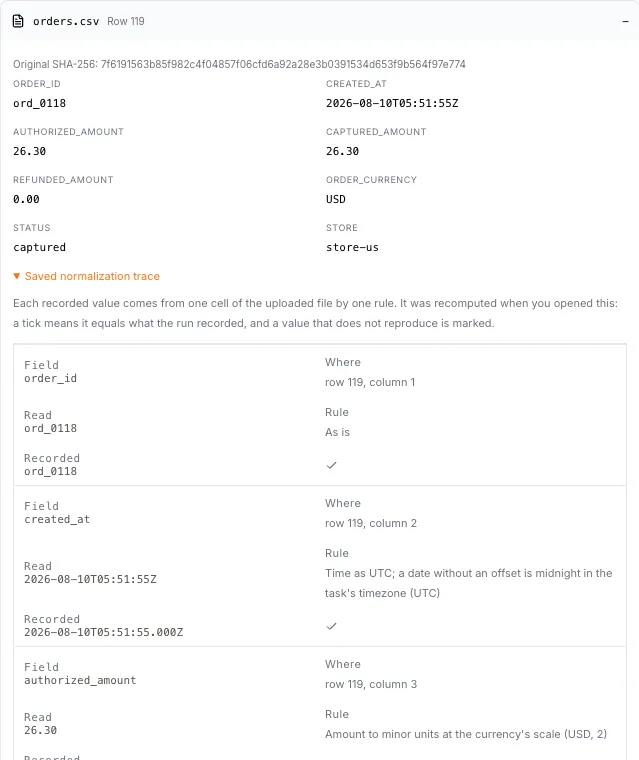
What was done about each exception is verified by a second person. Once approved, a fixed workpaper package is published with its checksum.

Silent screen recording of the real product with synthetic data. Press play.
Check a settlement CSV or XLSX file for missing columns and invalid rows before reconciliation. No sign-in required; limited to 512 KiB and 2,000 data rows per file.
Reconcile orders to payment transactions, payment transactions to payouts, and payouts to bank deposits. Review fees, timing and currency differences with source evidence.
Download four settlement reconciliation CSV templates for orders, provider transactions, payouts and bank transactions. Prepare input headers, then validate a file before review.
A settlement review needs more than a comparison of total sales and one bank deposit. The workspace links orders, provider transactions, payout batches and bank entries in three deterministic stages. Differences remain visible for review, and each recorded amount can be expanded to its source fields and calculation rules.
Inspect the supported review steps: Payment and payout reconciliation workflow
Before opening a review task, check whether one export has the required identifiers, dates, currencies and amounts. The public checker reports input problems without creating an approved reconciliation. The private workspace adds saved tasks, exception assignment, independent approval and evidence publication.
Try the file preparation step: Settlement CSV / XLSX file checker
The beta supports file-based settlement review using orders, provider transactions, payouts and bank transactions. It includes column mapping, deterministic checks, field-level evidence, exception review and publication. It is not a general ledger, tax engine or PDF invoice scanner.
No. Deterministic rules own amounts and matches. The optional Agent feature currently uses a fixed example reply in shadow mode and does not change approval content; a real model is not connected.
The current workflow starts with exported CSV or XLSX files. Provider names and reporting references do not mean a live bank feed or provider API connection is available.